What Is an API? A Simple 4-Step Guide (Zomato Example)
I’d watched that little delivery scooter crawl across the map a hundred times before I actually asked myself how it got there.
Ananya Kohli · July 2026 · 4 min read
Zomato didn’t build a mapping system. Google Maps didn’t build a food delivery app. So when you open Zomato and watch your order move across a live map in real time, you’re looking at two companies’ systems working together, without either of them actually touching the other’s servers.
What is an API, then? It’s the word for how that’s possible, and it gets used constantly and explained rarely. So I sat down, drew it out the way I actually understood it, and this is that.
From my notebook
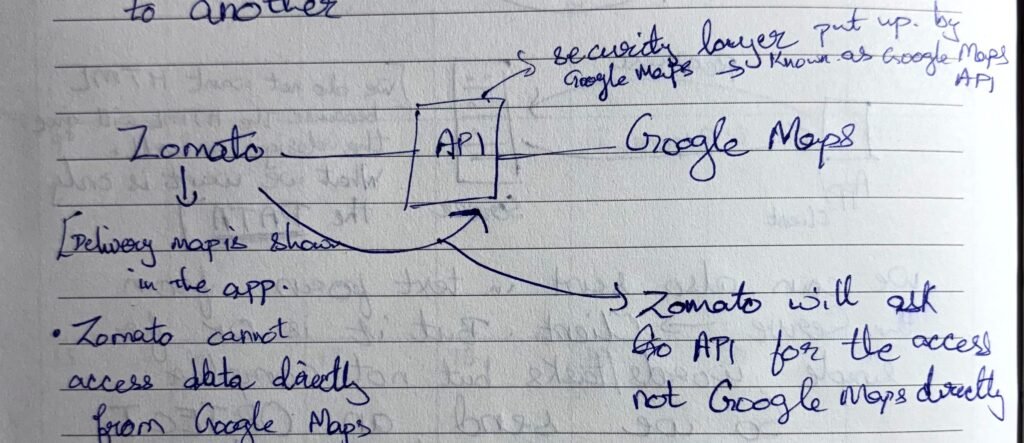
The line on this page that made it click for me: a messenger takes data from one place to another. That’s the entire idea an API is built on.
First: what is an API, actually?
API stands for Application Programming Interface, but if you’re asking what is an API in plain terms, ignore the acronym, it explains nothing on its own. What it actually is: a messenger that carries data from one system to another. MDN’s own API glossary entry puts it almost the same way: a contract between an application and whatever it’s asking for.
API A messenger between two systems that don’t otherwise talk to each other. It carries the request one way, and the answer back the other. It is not an app, not a website, not something you click on.
Here’s the analogy that finally made it stick for me: you, a waiter, and a kitchen. You don’t walk into the kitchen and tell the chef what you want. You tell the waiter. The waiter goes in, tells the kitchen, comes back out with your food. You never once touch the stove.
Zomato and Google Maps have exactly that relationship. The API is the waiter.
Why Zomato can’t just take the data itself
This was the part I had wrong for the longest time. I assumed Zomato just had map data sitting somewhere, the way a restaurant has its own menu.
It doesn’t. Zomato has no direct line to Google’s map data at all, and that’s not an accident. Google put up a security layer around its own systems, and the only sanctioned way through it is something Google built and maintains for exactly this purpose: the Google Maps Platform API.
- Zomato cannot access data directly from Google Maps.
- The delivery map you see inside the app is only possible because the API is standing in between.
- Zomato will ask the API for the access. Not Google Maps directly.
So the diagram above isn’t really “Zomato, API, Google Maps” as three equal boxes. It’s Zomato on one side, Google’s actual systems on the other, and one narrow, guarded door in the middle that both sides agreed to use.
What actually happens in that one second
This is the part most explanations skip past, and it’s the part that made the whole concept concrete for me. An API call isn’t mysterious. It’s closer to filling out a request slip and handing it to the one person allowed to walk it through to the back.
From my notebook
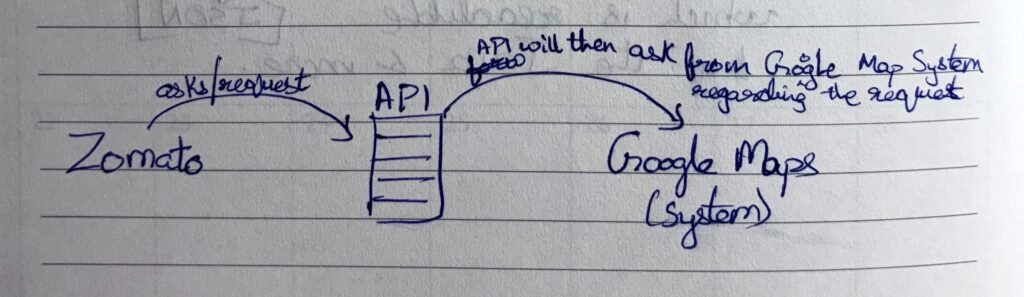
Here’s that same sequence written out:
- Zomato asks. It sends a request to the API — not to Google — for a route.
- The API asks Google’s system. This is the one conversation the API is cleared to have directly with Google’s servers.
- Google Maps responds. The route, the distance, the time, sent back to the API.
- The API hands it to Zomato. And that’s what renders as the live map on your screen.
Four steps, and you only ever notice the last one.
How is this different from Zomato just calling Google’s servers directly?
It’s a fair question, because the end result looks the same to you either way, a map, showing up. The difference is entirely about control. If Zomato could reach Google’s servers directly, there’d be no way to check who’s asking, how often, or what they’re allowed to see. The API is what makes that checking possible. It’s a gatekeeper as much as it’s a messenger, deciding what gets through and what doesn’t.
Why the answer comes back as JSON, not a map picture
One detail that confused me at first: whatever the API sends back isn’t a pretty map image. It’s raw data, almost always in a format called JSON (or sometimes XML).
Think of it as the difference between a chef plating a dish for a customer, and a chef writing the recipe on an index card for a different kitchen to use. Zomato’s app doesn’t need Google’s map styling. It needs the raw coordinates, so it can draw the map its own way.
A tiny slice of what that index card actually looks like:
{
  "distance_km": 3.2,
  "eta_minutes": 14,
  "route": [
    { "lat": 23.1815, "lng": 79.9864 },
    { "lat": 23.1790, "lng": 79.9902 }
  ]
}
No colors, no fonts, no tiles. Just the numbers an app needs to build its own version of the map.
The same shape, once you know to look for it
Zomato → API → Google Maps
- App has no map data of its own
- Sends a request through the API
- Gets back coordinates as JSON
- Draws its own version of the map
Your phone → API → Weather system
- App has no satellites of its own
- Sends a request through the API
- Gets back a forecast as JSON
- Draws its own version of the weather card
Once you see it in one place, you start noticing it everywhere: a payment box that appears inside a website that clearly isn’t the bank, “Login with Google” on an app that never sees your actual password. Same shape, every time. An application on one side, the real system on the other, and an API standing at the one door between them.
The one line I keep coming back to
Zomato never touches Google’s servers. It only ever talks to the API. And the API is the one deciding what it’s allowed to hand over, and what it isn’t.
That’s really the whole concept. Not something that needs a computer science degree, just a messenger with clearance, standing at a door two systems aren’t otherwise allowed to walk through.
This is part of a series where I write up concepts the way I actually worked through them, starting from my own notes, not the textbook version. If this is the kind of thing you enjoy, the rest of the blog has more of it, including how I worked through embeddings the same way.