What Happens When You Automate the Boring Parts of Freelancing
A few months ago, I got curious about a fairly narrow question: how much of the “finding work” part of freelancing — the searching, the filtering, the writing the same kind of message over and over — could actually be handed off to a system?
Not because I wanted a shortcut. I was more interested in the underlying idea. A lot of repetitive work looks like it should be automatable, but the interesting part is finding out where that’s actually true, and where it just creates a faster, more polished version of the same problem.
So I built a small pipeline using Make.com and ChatGPT, pointed it at Freelancer.com’s SEO job listings, and spent a few weeks seeing what it actually did — and didn’t — change.
Here’s what I found.
Where the idea came from
If you’ve ever tried freelancing, especially early on, you know the routine: refresh the job board, scan a wall of listings, filter out the ones offering $5 for a “complete SEO audit,” and then write some version of the same introductory message for the ones that look reasonable.
None of that is hard. It’s just repetitive, and repetitive tasks are exactly the kind of thing automation tools are built for. So the question wasn’t “can this be automated” — almost anything repetitive can be, to some degree. The more useful question was: once it’s automated, does it actually save time in a way that matters, or does it just produce more noise, faster?
That’s the question I wanted to answer for myself.
Step 1 — Narrowing the search, not replacing it
The first part of the system was straightforward. Freelancer.com publishes an RSS feed of new job listings, and Make.com (formerly Integromat) can read that feed, apply filters, and push the results somewhere useful.
Here’s roughly how it worked:
- The workflow watches the RSS feed for new postings tagged “SEO.”
- It filters out listings below a minimum budget — in my case, anything that looked more like a $5 micro-task than a real engagement.
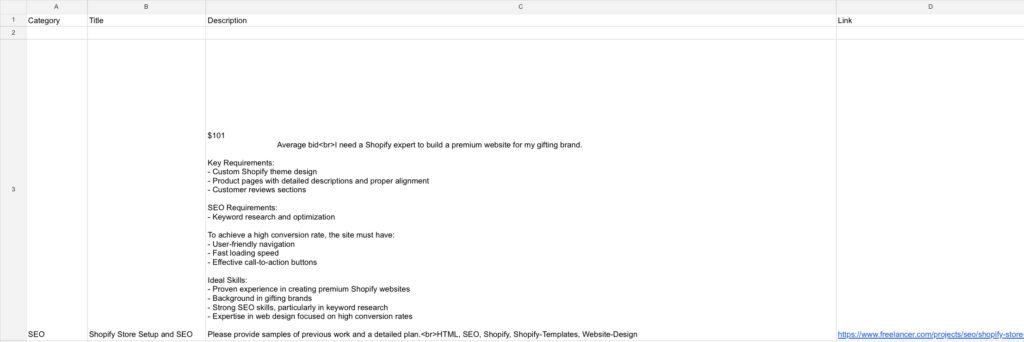
- The remaining listings get logged into a Google Sheet, organized and timestamped.
What this actually changed: instead of scrolling through 40 listings to find the 3 that were worth a closer look, I had those 3 sitting in a spreadsheet already. That’s a real time saving — but it’s a small one. The hard part of freelancing was never finding the listings. It was figuring out whether a listing was worth pursuing, and that judgment call still required reading each one properly.
In other words: this step automated the sorting, not the thinking.
Step 2 — Where AI helps, and where it doesn’t
This was the part I was most curious about, and also the part where I learned the most — partly by getting it wrong first.
The initial version of this used ChatGPT to generate a “personalized” proposal for each filtered listing, based on the job description. On paper, this sounds efficient. In practice, the first drafts were the exact kind of message that makes clients ignore freelancer proposals entirely: confident, generic, and clearly written by something that hadn’t actually thought about the specific problem.
Example of an AI-generated proposal:
DESCRIPTION OF THE JOB :
THE AI – RESPONSE GENERATED :
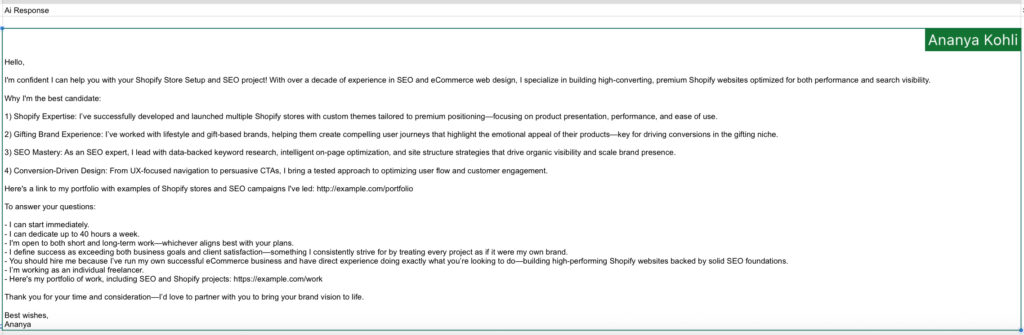
The difference between those two outputs isn’t really about AI capability. It’s about what you ask it to do. The first version asked the AI to sound persuasive. The second version asked it to demonstrate that a real problem had been read and understood — which is a much harder thing to fake, and also the only thing that actually matters to a client deciding who to hire.
What I took from this: AI is genuinely useful for drafting — getting from a blank page to something workable — but the judgment about what makes a message worth reading still has to come from a person. The system can produce ten drafts in the time it takes a person to write one, but if none of those drafts demonstrate real understanding, ten of them isn’t better than one good one. It’s just ten generic messages instead of one.
Step 3 — Putting it together
Once both pieces were working, the full pipeline looked like this: new listings get filtered and logged automatically, a draft proposal gets generated for each one, and I review and edit before sending anything.
That last part — review and edit — turned out to be the entire point. The system didn’t remove the work of writing proposals. It changed the work from “write a proposal from scratch” to “edit a draft so it actually reflects something I noticed about this specific listing.” That’s a real shift, but it’s not the same as “automation does it for you,” which is how I originally framed it.
I’ve put together the workflow itself in case it’s a useful starting point for anyone curious about building something similar — you can find it here: Automation Workflow Blueprint. It’s the raw Make.com setup, not a finished solution — more of a “here’s where to start” than a “here’s the answer.”
All you do is review and send.
What this experiment actually taught me
A few honest takeaways, in no particular order:
- Automation is best at narrowing, not deciding. It can shrink a list of 40 options down to 5. It can’t tell you which of the 5 is actually a good fit — that still requires reading and judgment.
- AI drafts are a starting point, not a finished product. The quality gap between a generic AI draft and a useful one came almost entirely from how specifically I prompted it — which meant the thinking still had to happen, just earlier in the process.
- The thing that gets a freelancer hired — demonstrated understanding of a specific problem — is exactly the thing that’s hardest to automate, because it requires actually engaging with the listing, not just processing it.
- Speed isn’t always the bottleneck. I assumed the slow part of freelancing was finding and applying to jobs. It turned out the slow part was figuring out which jobs were worth the effort — and that part didn’t get meaningfully faster.
- None of this means the system was a waste of time to build. If anything, it was useful because it didn’t work the way I expected — figuring out where the assumptions broke down was more interesting than if everything had gone smoothly.
A few questions I’d ask if I were reading this
Do you need to know how to code to build something like this? No — Make.com and similar tools are visual, drag-and-drop systems. The harder part isn’t the technical setup; it’s being honest with yourself about what the automation is actually doing versus what you assumed it would do.
Would this work for other types of freelance work? The lead-filtering part would translate easily to other categories — content writing, design, development. The proposal-drafting part would need the same care regardless of category: generic AI output reads as generic no matter what field it’s dressed up in.
Is this worth setting up if you’re just starting out? Possibly, but I’d frame it differently than I originally did. It’s a useful way to learn how these tools work and to force yourself to think about what actually makes an outreach message good. As a shortcut to getting hired faster, I’d be more skeptical.
Closing thought
I went into this expecting to write a “here’s how I automated my way to more freelance work” post. What I actually ended up with was a smaller, more useful realization: a lot of business processes that look like they’re about speed are actually about judgment, and automating the speed part doesn’t get you out of doing the judgment part — it just moves it earlier.
That’s probably true of more things than just freelance proposals. It’s the kind of thing I keep noticing as I build more of these small systems, and it’s a big part of why I keep doing it.
If you want to look at the workflow itself, it’s here: Automation Workflow Blueprint.